前提
部署好k8s集群,部署好ingress-nginx控制器
下面方法是使用自建的阿里云镜像部署ingress-nginx
docker pull registry.cn-hangzhou.aliyuncs.com/yutao517/ingress_nginx_controller:v1.1.0
docker tag registry.cn-hangzhou.aliyuncs.com/yutao517/ingress_nginx_controller:v1.1.0  k8s.gcr.io/ingress-nginx/controller:v1.1.0

docker pull registry.cn-hangzhou.aliyuncs.com/yutao517/kube_webhook_certgen:v1.1.1
docker tag registry.cn-hangzhou.aliyuncs.com/yutao517/kube_webhook_certgen:v1.1.1  k8s.gcr.io/ingress-nginx/kube-webhook-certgen:v1.1.1
kubectl apply -f https://download.yutao.co/mirror/deploy.yaml
kubectl get svc -n ingress-nginx

kubectl get pod -n ingress-nginx

部署成功ingress-nginx
部署一个 Hello World 应用
参照官方文档
本节yaml源码地址 https://download.yutao.co/k8s/ingress-project/hello-world-tomcat/
创建Deployment
vim hello-deploy.yaml
apiVersion: apps/v1
kind: Deployment
metadata:
  name: web
spec:
  selector:
    matchLabels:
      run: web
  replicas: 1
  template:
    metadata:
      labels:
        run: web
    spec:
      containers:
      - name: web
        image: registry.cn-hangzhou.aliyuncs.com/yutao517/hello-app:1.0
        ports:
        - containerPort: 8080
kubectl apply -f hello-deploy.yaml
或者使用命令
kubectl create deployment web --image=registry.cn-hangzhou.aliyuncs.com/yutao517/hello-app:1.0

暴露服务
vim hello-svc.yaml
apiVersion: v1
kind: Service
metadata:
  name: web
  labels:
    run: web
spec:
  type: NodePort
  ports:
  - port: 8080
    targetPort: 8080
    protocol: TCP
    name: http
  selector:
    run: web
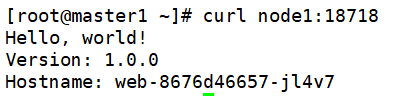
kubectl apply -f hello-svc.yaml
或者使用命令
kubectl expose deployment web --type=NodePort --port=8080

创建Ingress
vim hello-ingress.yaml
apiVersion: networking.k8s.io/v1
kind: Ingress
metadata:
  name: example-ingress
  namespace: default
spec:
  ingressClassName: nginx
#使用nginx的IngressClass(关联的ingress-nginx控制器)
  rules:
    - host: hello-world.info
#将域名映射到web服务
      http:
        paths:
          - path: /
            pathType: Prefix
            backend:
              service:
                name: web
                port:
                  number: 8080
#将所有请求发送到web服务的8080端口
kubectl apply -f hello-ingress.yaml
kubectl get ingress
看到IP ADDRESS

添加域名解析规则
cat <<EOF >>/etc/hosts
10.10.121.81  hello-world.info
EOF
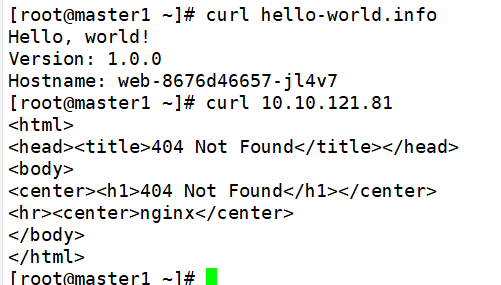
curl hello-world.info
curl 10.10.121.81
检验效果的不同,发现域名正常访问,但是IP无法访问,因为hello-ingress.yaml只设置了域名host的指向,没有设置IP
创建第二个 Deployment
kubectl create deployment web2 --image=registry.cn-hangzhou.aliyuncs.com/yutao517/hello-app:2.0
暴露端口
kubectl expose deployment web2 --port=8080 --type=NodePort
编辑现有的 Ingress
vim example-ingress.yaml
追加v2路径
           - path: /v2
             pathType: Prefix
             backend:
               service:
                 name: web2
                 port:
                   number: 8080
kubectl apply -f example-ingress.yaml
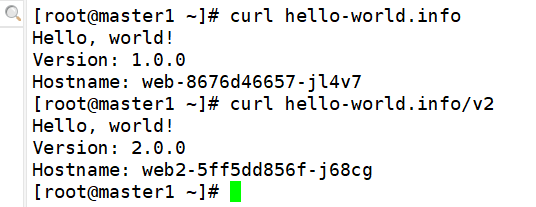
curl hello-world.info
curl hello-world.info/v2
配置HPA对Nginx Ingress性能调优
Nginx参数调优:
-
调整单个Worker的最大连接数
-
增加连接超时时间
按照负载配置HPA进行自动扩容
apiVersion: autoscaling/v2
kind: HorizontalPodAutoscaler
metadata:
  name: ingress-nginx-controller-hpa
  namespace: ingress-nginx
spec:
  maxReplicas: 10 #最大副本数
  minReplicas: 2 #最小副本数
  metrics:
    # 设置触发伸缩的 CPU 利用率
    - type: Resource
      resource:
        name: cpu
        target:
          averageUtilization: 50
          type: Utilization
    # 设置触发伸缩的 MEM 利用率
    - type: Resource
      resource:
        name: memory
        target:
          averageUtilization: 75
          type: Utilization
  scaleTargetRef:
    apiVersion: apps/v1
    kind: Deployment #需要伸缩的资源类型
    name: ingress-nginx-controller  #需要伸缩的资源名称
kubectl get hpa -n ingress-nginx

kubectl get pod -n ingress-nginx
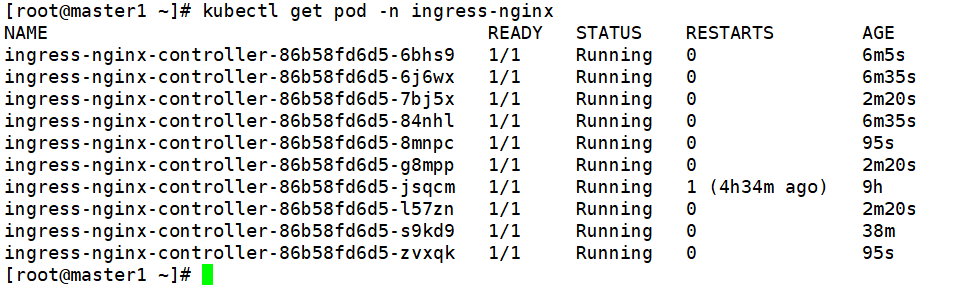
可以看到Pod数量增加,内存和CPU均保持在规定利用率